
Cormant-CS Screen Shots
Cormant-CS Dashboards
Cormant-CS Dashboards can be configured to present the user with the data that are most interesting to them. Dashboard supports user defined historical and point in time reports. Dashboards data can be presented as bar, line and pie chart displays in up to 4 columns of visual dashboard data.
Cormant-CS Asset Management
Pictured below, User defined Asset details of a server. Cormant-CS supports an unlimited number of user defined attributes. Users can configure any custom data attribute for any piece of infrastructure hardware. Support for multiple data types including selection drop down, date and hyperlinked attributes. Full security of attribute data by role is supported.
Cormant-CS Data and Power Connectivity
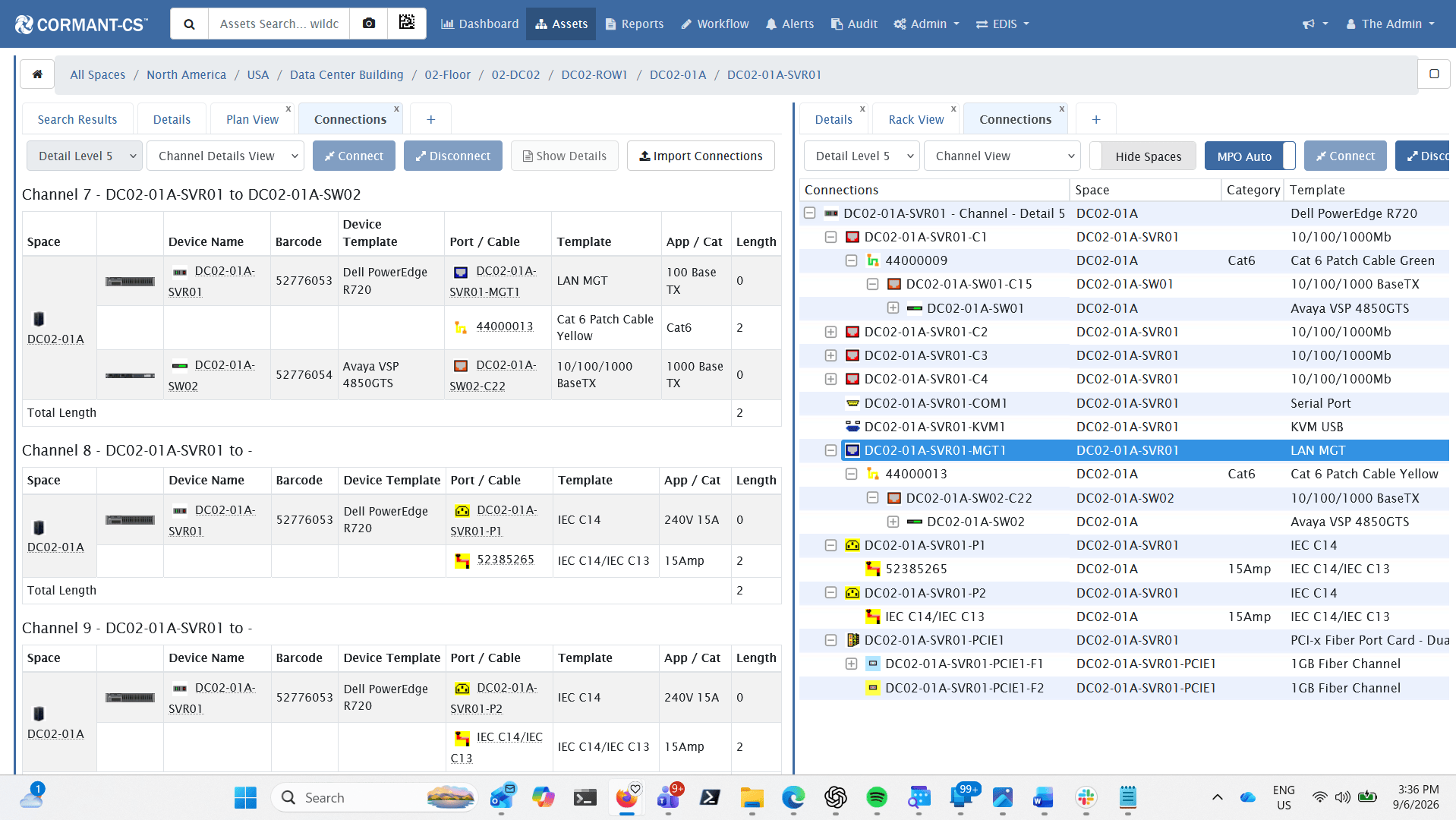
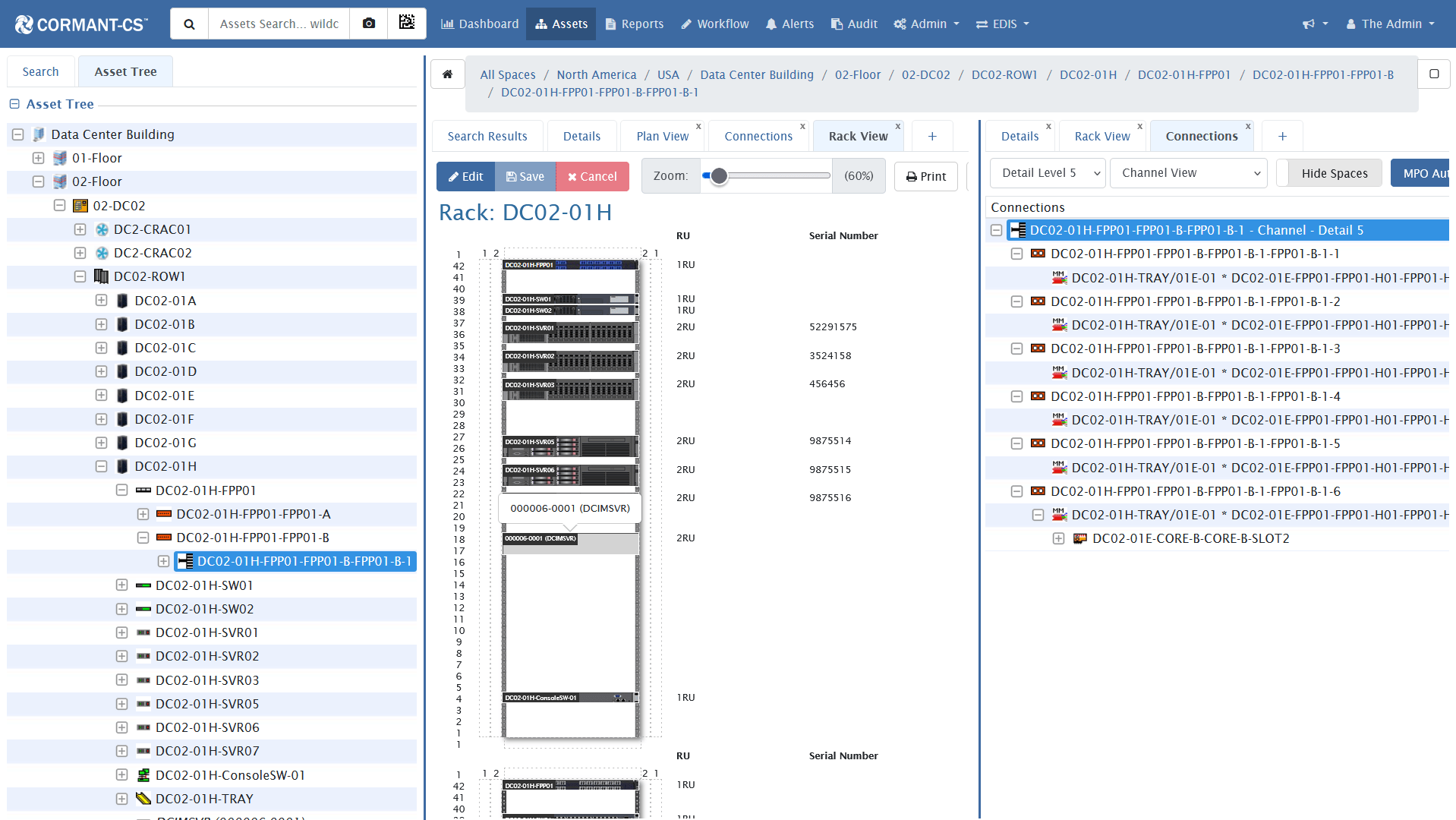
Cormant-CS includes support for documentation of all data and power cables and termination hardware. Full support for all copper, fiber, and power channel documentation with built in dependency reporting. Full functionality available on mobile devices with support for barcode/RFID scanning inputs and audits.
Cormant-CS MPO Fiber Connectivity
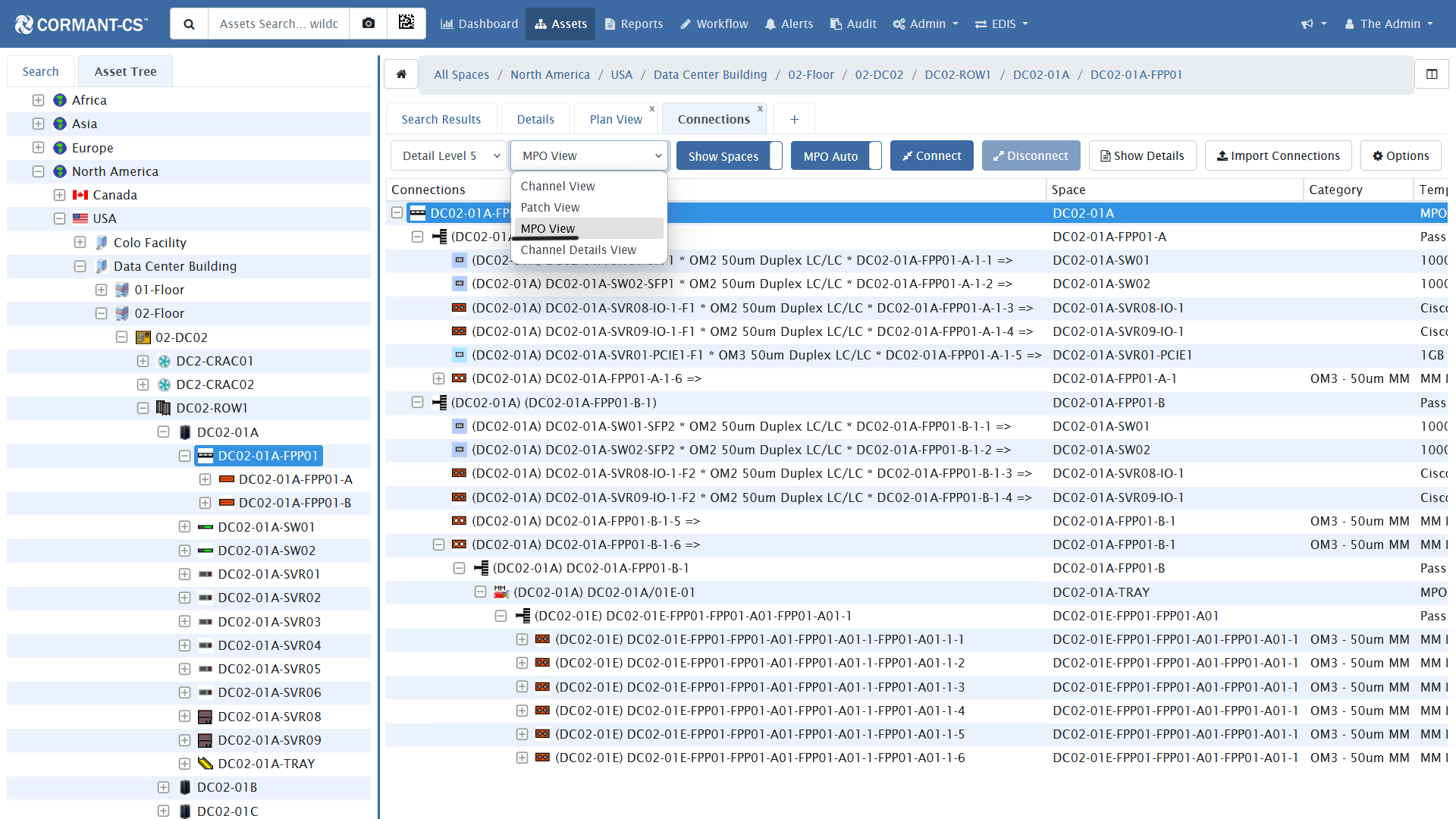
Cormant-CS includes support for documentation of high capacity MPO fiber cables and termination hardware. Full support for cables and modules where single MPO ports fan out into multiple LC or other connections. Full functionality available on mobile devices with support for barcode scanning inputs and audits.
Cormant-CS Datacenter Floor Plans
Cormant-CS floor plans show visual representations for the physical datacenter floor space. Cormant-CS includes support for user defined color coding of the cabinets on the datacenter floor to easily view available capacities. Support for 2D and 3D viewing with pan, tilt and zoom-in and out using mouse scroll.


Cormant-CS Rack Elevation Views
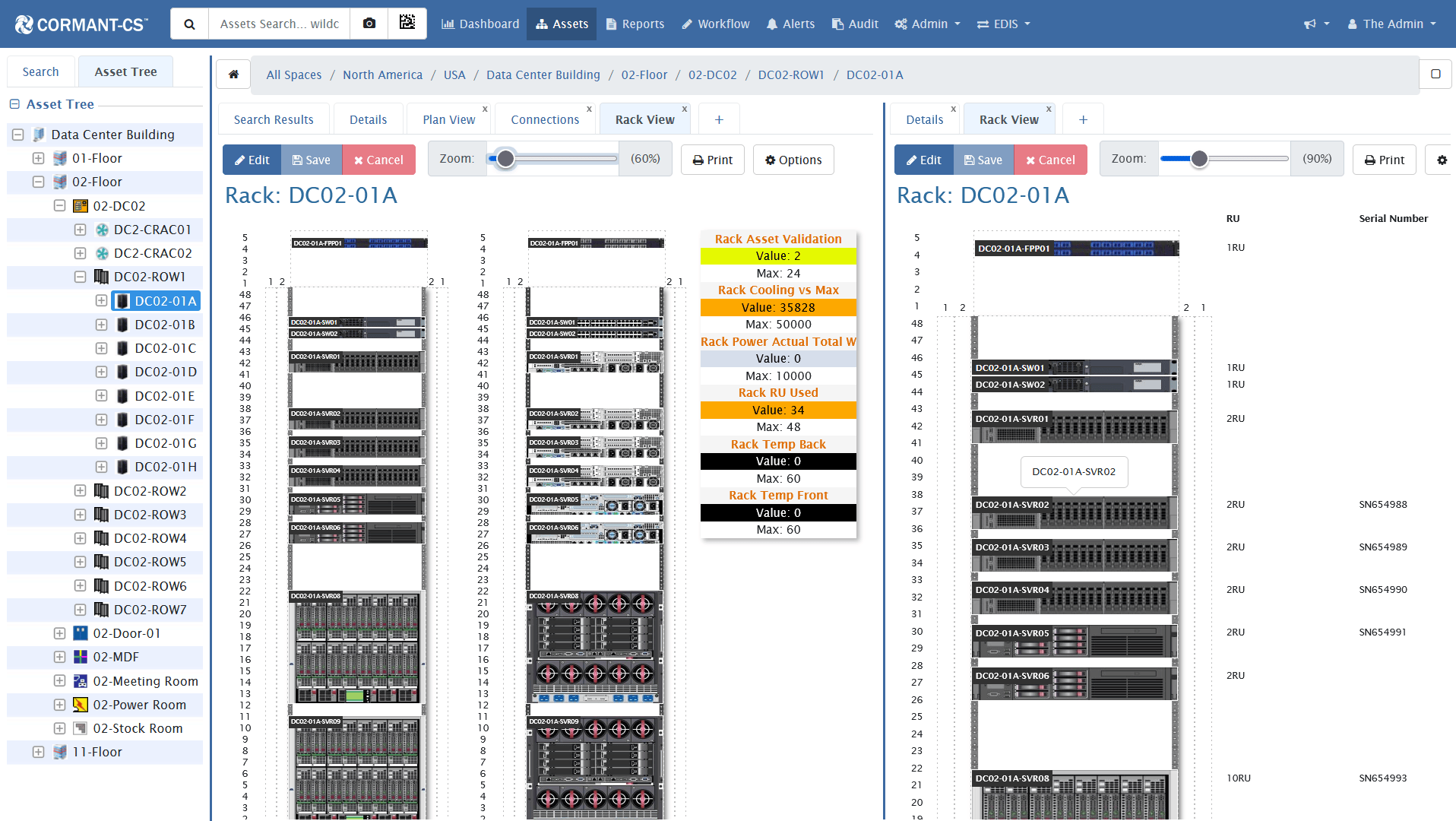
Cormant-CS includes front and back images for all templates with support for user defined images where desired. Cormant-CS allows users to view front and back of rack views with support for user defined data points on the rack view. Rack and row views can be exported and printed.
Front and back graphical view of the individual racks in a row.
Cormant-CS Workflow
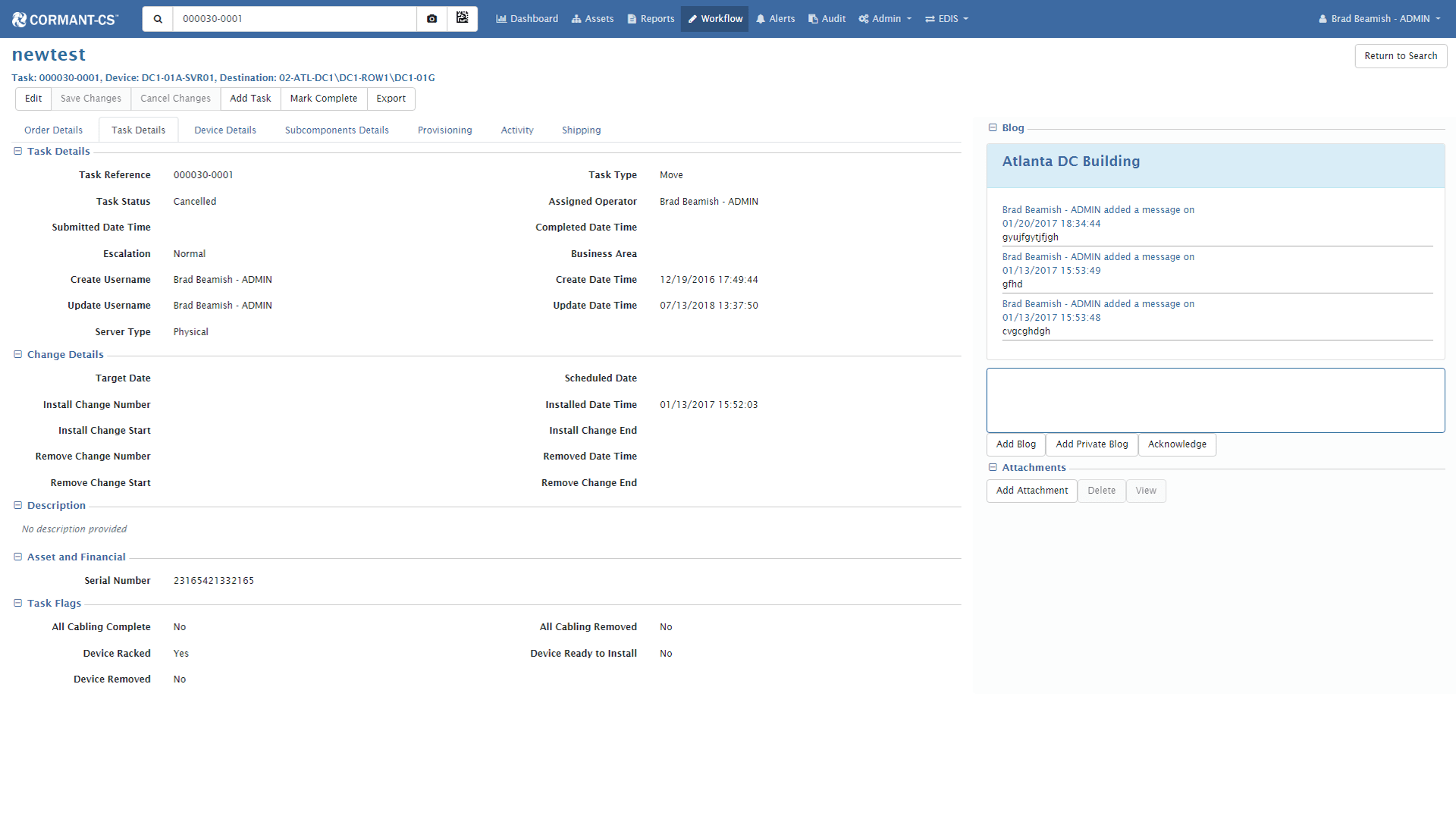
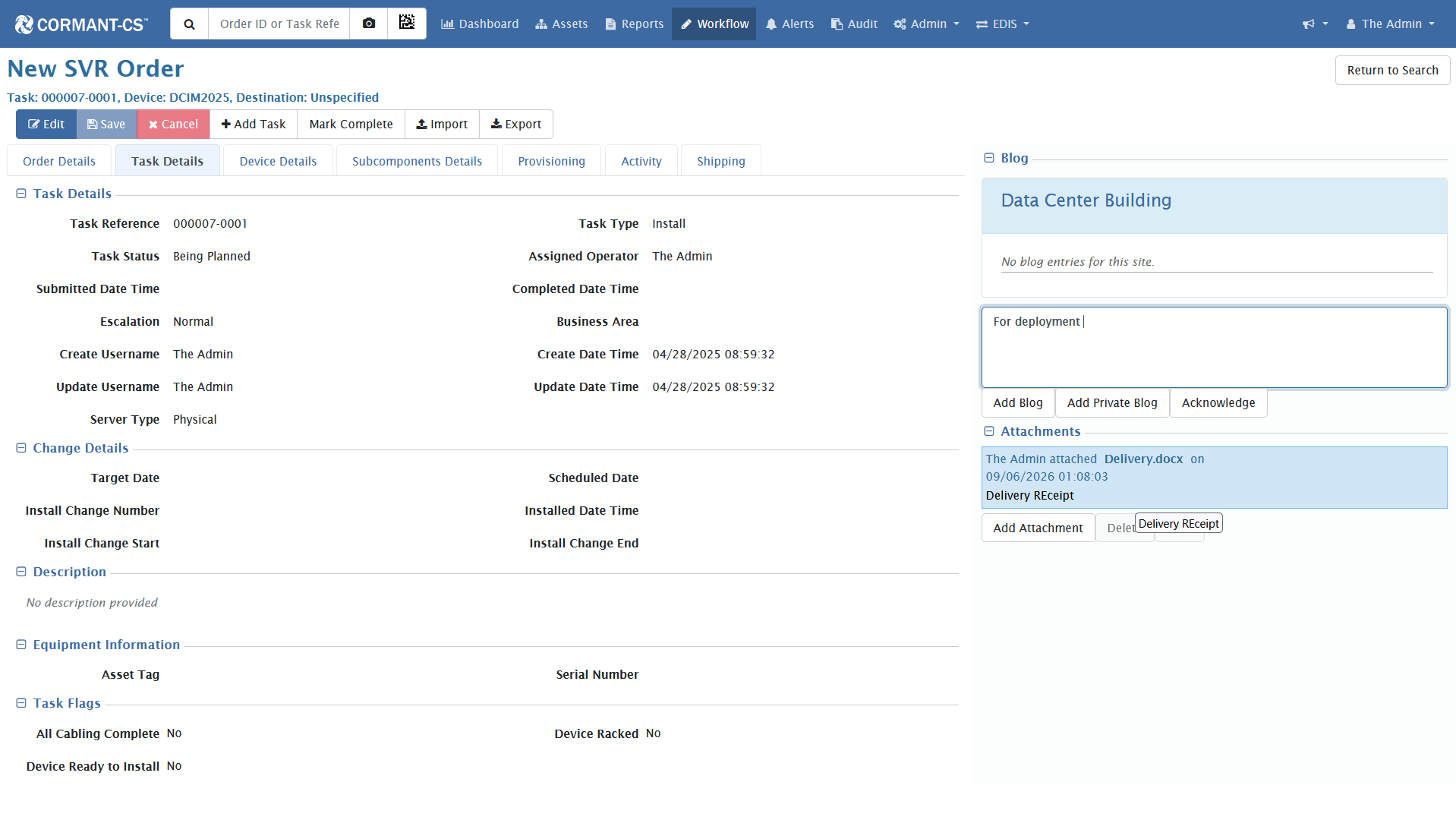
Cormant-CS includes a workflow module to help users plan and execute change within the datacenter space. Workflow can suggest asset placement, users can reserve equipment and RU and plan asset provisioning and connections within the Workflow module. Workflow details should be accessed on mobile devices and updated as changes are made.
Workflow screen showing details of a task.
Alerts Module and Thresholds
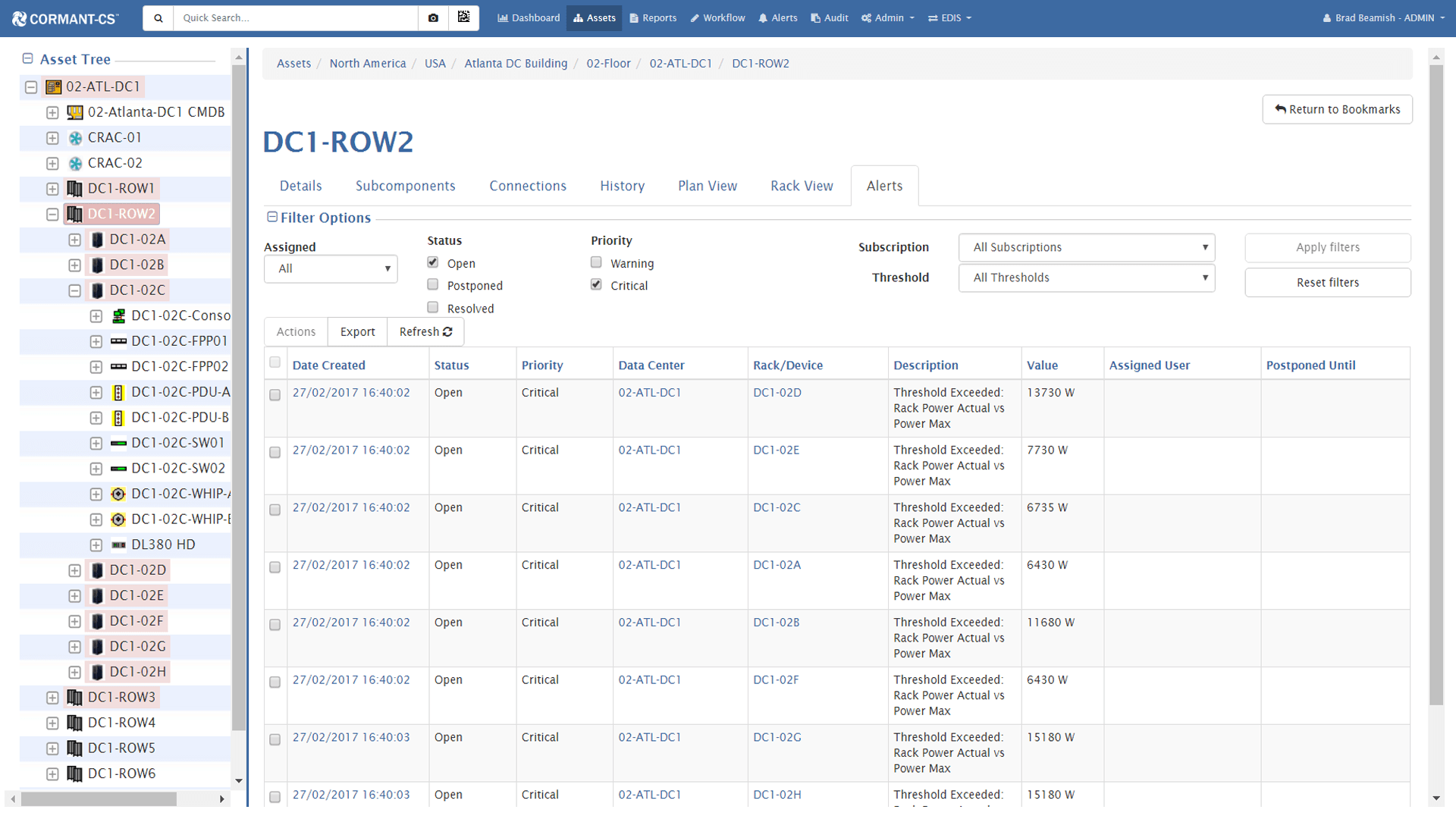
Cormant-Cs includes support for user defined alerts and thresholds. Users can configure alerts, thresholds and subscriptions to receive immediate email notification of critical alerts statuses. Alert capacities can be applied to floor plans to create color coded floor plans. Critical alerts can be configured to show as red shading in the affected areas in the Asset tree.
Cormant-CS Dashboards
Cormant-CS Dashboards can be configured to present the user with the data that are most interesting to them. Dashboard supports user defined historical and point in time reports. Dashboards data can be presented as bar, line and pie chart displays in up to 4 columns of visual dashboard data.
Cormant-CS Asset Management
Pictured below, User defined Asset details of a server. Cormant-CS supports an unlimited number of user defined attributes. Users can configure any custom data attribute for any piece of infrastructure hardware. Support for multiple data types including selection drop down, date and hyperlinked attributes. Full security of attribute data by role is supported.
Cormant-CS Data and Power Connectivity
Cormant-CS includes support for documentation of all data and power cables and termination hardware. Full support for all copper, fiber, and power channel documentation with built in dependency reporting. Full functionality available on mobile devices with support for barcode/RFID scanning inputs and audits.
Cormant-CS MPO Fiber Connectivity
Cormant-CS includes support for documentation of high capacity MPO fiber cables and termination hardware. Full support for cables and modules where single MPO ports fan out into multiple LC or other connections. Full functionality available on mobile devices with support for barcode scanning inputs and audits.
Cormant-CS Datacenter Floor Plans
Cormant-CS floor plans show visual representations for the physical datacenter floor space. Cormant-CS includes support for user defined color coding of the cabinets on the datacenter floor to easily view available capacities. Support for 2D and 3D viewing with pan, tilt and zoom-in and out using mouse scroll.


Cormant-CS Rack Elevation Views
Cormant-CS includes front and back images for all templates with support for user defined images where desired. Cormant-CS allows users to view front and back of rack views with support for user defined data points on the rack view. Rack and row views can be exported and printed.
Front and back graphical view of the individual racks in a row.
Cormant-CS Workflow
Cormant-CS includes a workflow module to help users plan and execute change within the datacenter space. Workflow can suggest asset placement, users can reserve equipment and RU and plan asset provisioning and connections within the Workflow module. Workflow details should be accessed on mobile devices and updated as changes are made.
Workflow screen showing details of a task.
Alerts Module and Thresholds
Cormant-Cs includes support for user defined alerts and thresholds. Users can configure alerts, thresholds and subscriptions to receive immediate email notification of critical alerts statuses. Alert capacities can be applied to floor plans to create color coded floor plans. Critical alerts can be configured to show as red shading in the affected areas in the Asset tree.
DCIM Tool User Interface Screenshots
Explore interface screenshots of the Cormant DCIM tool. See how our enterprise DCIM product simplifies IT asset tracking, end-to-end connectivity, capacity management, floor plans, rack elevations, and offline mobile operations.
Visual user interface features of our enterprise DCIM tool
Cormant DCIM turns complex physical infrastructure records into clear, actionable screens. Evaluate how our DCIM product allows IT and facilities teams to seamlessly zoom from enterprise-wide dashboards down to a specific rack, asset, port, or cable connection.
Click to enlarge
Configurable DCIM tool dashboards
Bring critical physical infrastructure data into one unified view. Cormant DCIM product dashboards combine power trends, cooling metrics, rack capacity, floor plans, and operational alerts tailored to each team role.
Click to enlarge
Detailed asset records & CI tracking
Maintain accurate records for servers, network equipment, power devices, and spares. Configurable attributes, lifecycle status, serial numbers, and location details provide one trusted source for IT asset management.
Click to enlarge
End-to-end data & power path tool
Document complete power and data circuits from device ports through patch panels and intermediate connections. Precise physical connectivity mapping speeds up incident troubleshooting and capacity planning.
Click to enlarge
MPO fiber connectivity mapping
Model high-density MPO fiber infrastructure including trunks, cassette modules, fan-outs, and individual strands. Trace complex optical paths to manage high-speed data center connectivity.
Click to enlarge
Data center hall floor plans
Visualize rooms, rows, racks, and infrastructure capacity using data-driven floor plans. Configurable color-coding helps teams identify space, power, thermal, and weight limits at a glance.
Click to enlarge
Enterprise IT campus floor plans
Extend infrastructure visibility beyond central data halls. Document work areas, communications rooms, remote offices, edge sites, and pathways across enterprise facilities.
Click to enlarge
Interactive front & rear rack elevations
View front and rear rack elevations showing precise asset placement, rack-unit utilization, and device details. Plan new hardware deployments and produce clear visual records without CAD software.
Click to enlarge
Planned & auditable workflows
Plan, assign, and audit moves, adds, changes, and decommissions. Reserve rack space and ports in advance, issue task instructions, and preserve a complete audit trail of completed work orders.
Click to enlarge
Alert thresholds & notifications
Set custom thresholds and subscriptions for power, environmental, and operational conditions. Color-coded visual alerts help operations teams identify impacted assets and respond before downtime occurs.
Click to enlarge
DCIM tool capacity analytics
Analyze available rack space, power load, cooling reserves, and network port availability. Combine current, planned, and historical data to forecast expansion needs and optimize existing infrastructure.
Click to enlarge
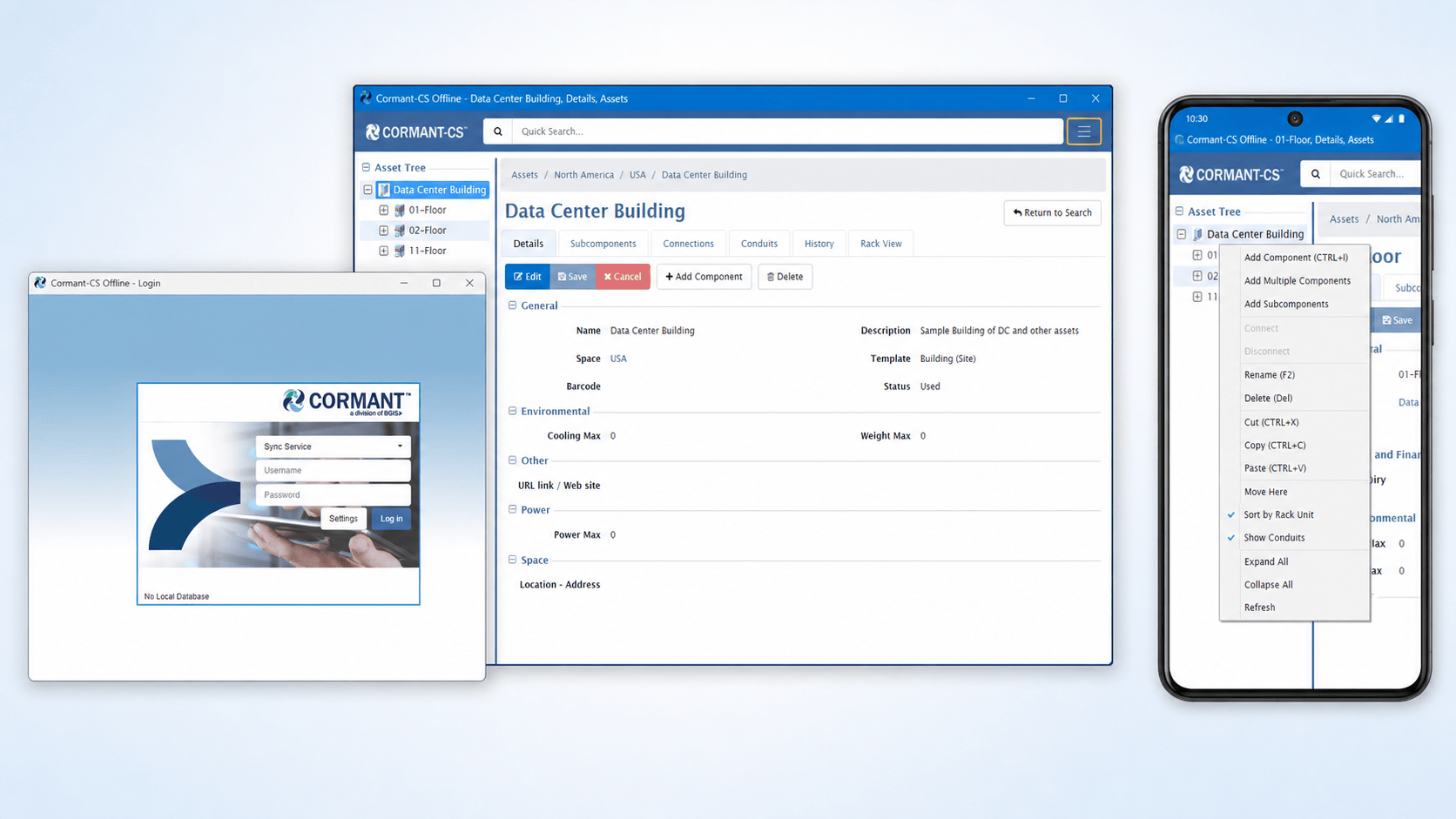
Mobile & offline DCIM user interface
Keep records accurate in the field. Native Windows and Android offline applications allow technicians to perform barcode/RFID scans and complete work orders in secure environments without Wi-Fi or cellular service.
Click to enlarge
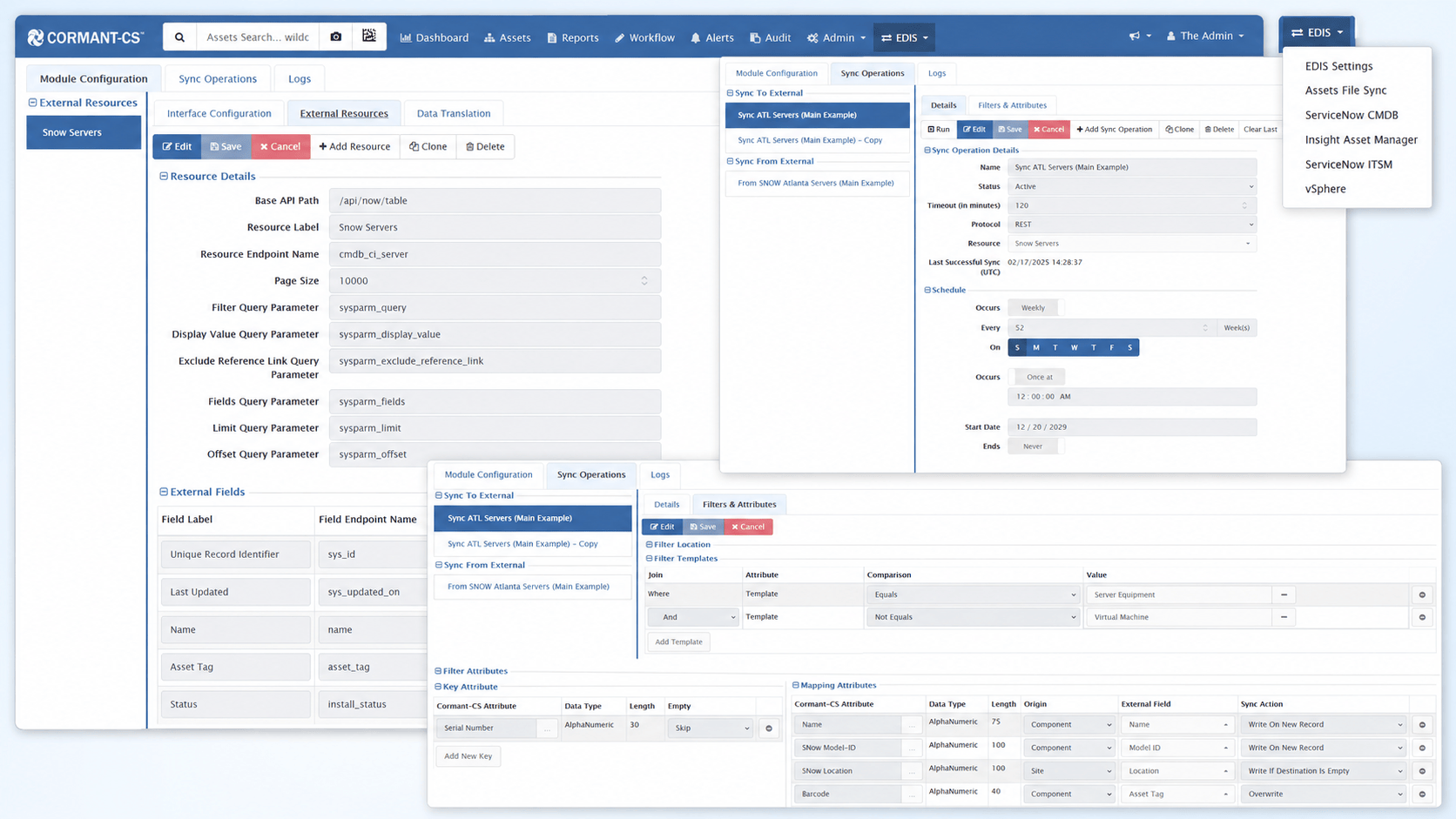
Enterprise integration engine (EDIS)
Connect Cormant DCIM with ServiceNow, Microsoft Entra ID, CMDBs, ITSM platforms, and BMS systems. Flexible REST APIs, field mapping, and automated schedules keep enterprise databases synchronized.
Click to enlarge
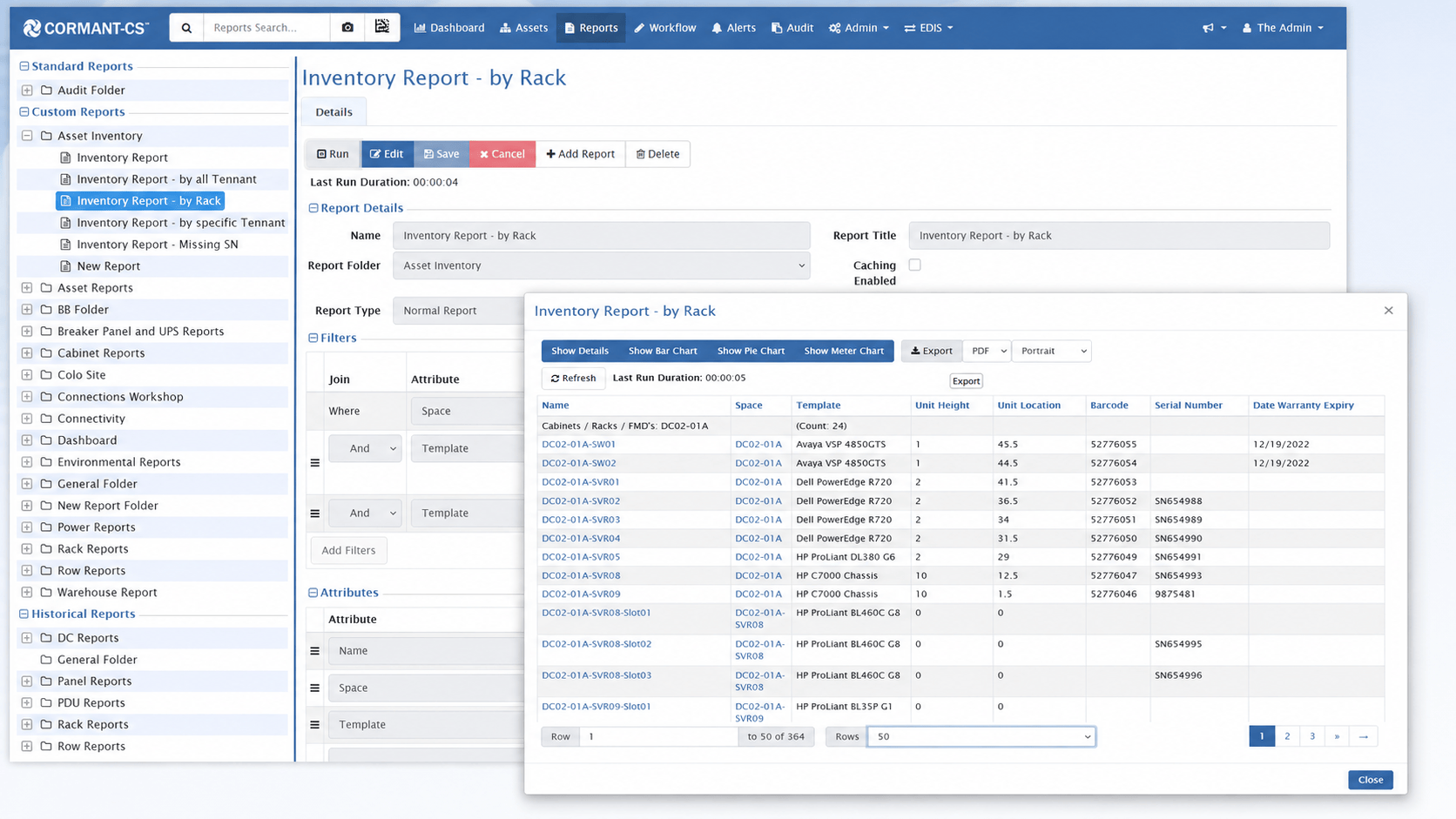
Configurable reports & audit charts
Generate detailed infrastructure reports using custom filters and attributes. Review results as data tables or visual charts, and export reports to support operational reviews and audit requirements.
See our DCIM product with your infrastructure in mind
Schedule a focused walkthrough with a BGIS Cormant DCIM specialist to see how our tool supports your assets, connectivity, floor plans, and integrations.